When you select one or more statics, Campaign Builder checks the number of statics selected and their aspect ratios, then unlocks the relevant publishing options automatically:
Note: Options that do not match your current selection will be greyed out. For example, Carousel Ad will only become available once you have selected two or more 1:1 statics.
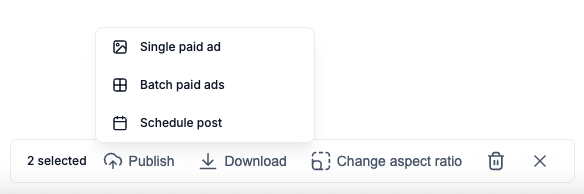
Publish as a Single Paid Ad
Use this option to launch one static as a standard single-image ad on Facebook or Instagram. You can connect it to an existing campaign and ad set, or create a new one.
How to publish a single paid ad
Tip: Make sure your Meta ad account is connected in Campaign Builder Settings before using this feature.
Publish as a Carousel Ad
A carousel ad lets you show multiple images in a single ad unit, with each image as a swipeable card. Campaign Builder will automatically arrange your selected statics as carousel cards.
To use this option, you must select two or more statics that are all in 1:1 (square) format. Mixed aspect ratios are not supported for carousel ads.
How to publish a carousel ad
Note: Meta carousel ads require all cards to be in 1:1 format. If you have statics in other aspect ratios, generate new 1:1 versions before publishing as a carousel.
Tip: Carousel ads work well for showcasing multiple products, colour variants, or a step-by-step story in a single ad placement.
Publish as Batch Paid Ads
Batch Paid Ads lets you publish multiple statics as individual ads in a single action. Each static becomes its own ad - Campaign Builder creates them all at once, saving you from setting up each ad manually.
How to publish batch paid ads
Tip: Batch publishing is ideal after generating 3 to 5 variations of the same creative - publish them all into the same ad set for easy A/B comparison in Meta Ads Manager.
Schedule a Social Media Post
Use the Scheduler to publish any static (or group of statics) as an organic social media post on Facebook, Instagram, TikTok or Linkedin. You choose the platform, set a date and time, write a caption, and Campaign Builder takes care of the rest.
Note: Scheduled posts appear in your Campaign Builder social media calendar, where you can edit or cancel them before they go live.
Tip: If you select multiple statics for a scheduled post, they will be published as a multi-image post. Make sure the images are ordered the way you want them before scheduling.

