Feed Management - Clean, Optimize & Automate Your Product Feeds
Centralize and streamline your product feed workflows with Campaign Builder’s Feed Management tools. Organize, optimize, and sync your product data to power dynamic ads, automation, and personalized campaigns across platforms - without manual spreadsheets or errors.
No credit card required • 30-day free trial • Setup in 5 mins.
What Is Feed Management?
Feed management refers to the process of consolidating product data from your store or catalog, cleaning and optimizing that data, and then syncing it with advertising platforms and other marketing tools. A well-managed feed ensures product information - including images, titles, prices, availability, and attributes - is accurate, up-to-date, and formatted correctly for every channel you advertise on.
With precise feed management, marketers avoid common errors like disapproved ads, mismatched product info, or outdated pricing, while ensuring optimal performance for catalog and dynamic product ads.
Lightning-Fast Setup
Connect your store or catalog and launch your first feed in just a few clicks. No complicated rules, no dev help - just a feed that’s ready to go instantly.
Flexible Feed Editing
Easily clean, optimize, and enrich product data with custom rules and transformations. Adjust titles, descriptions, images, or prices - all without touching the source catalog.
Connect Your Product Data
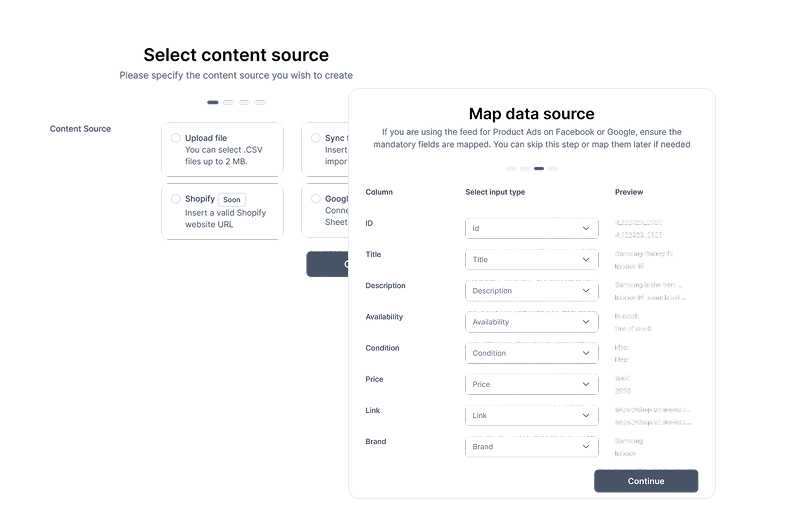
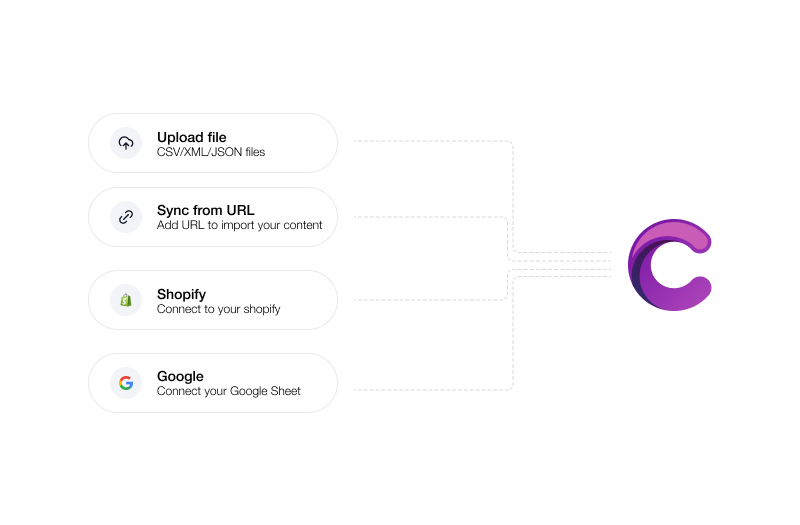
Import product data from the sources you already use - Excel, CSV, JSON, Google Sheets, Shopify, or even direct sync via URL.
Always Up-to-Date
Schedule automatic updates so your ads always reflect your latest products, pricing, and availability - no more manual syncs or outdated campaigns.
Get started with feed management
From raw product data to polished creatives - streamline your feed workflow in five simple steps.
From product data to campaign-ready creatives - control every step of the feed workflow.
Multi-platform feed
Connect feeds from Shopify, WooCommerce, CSV, or custom sources to build creatives automatically.
Dynamic template mapping
Assign feed fields to ad templates so titles, images, and prices populate automatically.
Bulk creative generation
Turn a single feed into hundreds of creative variations in seconds - ready to publish.
Real-time updates
Update your feed, and all associated creatives refresh instantly - no re-export needed.
Feed-based rules & logic
Set conditions like “only show products in stock” or “highlight discounted items” for smarter creative generation.
Automation at scale
Connect feeds to your workflow for ongoing campaigns, catalog ads, and multi-market rollouts.
Analytics-ready
Track performance per product, category, or template to optimize your creatives continuously.
Brand consistency
Keep your feed-based ads consistent with brand guidelines across all formats, markets, and templates.
Frequently asked questions
Everything you need to know about Data Feeds
What is feed management?
Feed management is the process of importing, organizing, optimizing, and syncing your product data so it’s accurate and usable for advertising and marketing platforms.
Which platforms does Campaign Builder support for feed export?
Campaign Builder supports feed outputs for platforms including Meta (Facebook & Instagram), Google Shopping, TikTok, and other advertising networks.
Can I automate feed updates?
Yes. Set up scheduled syncs so your product data updates automatically, keeping prices, availability, and content fresh without manual intervention.
How does feed optimization improve ad performance?
Optimized product feeds reduce errors, improve relevance, and help ad platforms match products to the right audiences, resulting in better click-through rates and conversion.
Can agencies manage multiple clients’ feeds?
Absolutely. Agencies can manage, apply optimization rules, and automate feed workflows for multiple client catalogs from a workspace.
Create More Data Feeds. In Less Time
Ready to Take Control of Your Product Feeds?
Accurate, optimized product data means better ads, fewer errors, and more conversions. Start managing your product feeds with confidence today.




.png)

